Why Nimble Is the Bold Choice Your Design Library Needs
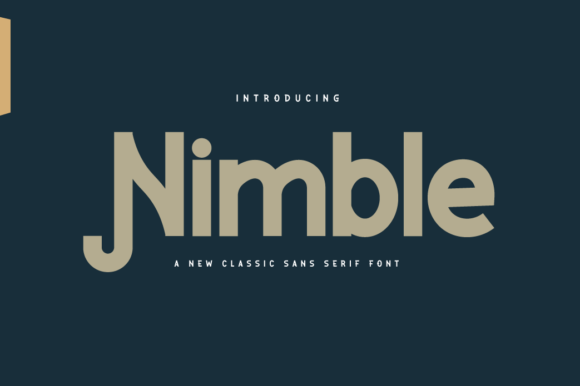
You are likely standing at a crossroads in your project. Maybe you are finalizing a brand identity for a new startup, designing a high-conversion landing page, or simply trying to make a personal portfolio look less generic. In these moments, the choice of typography often gets overshadowed by color palettes or imagery, yet it remains the silent architect of your message. This is where Nimble steps in. It is not just another sans serif; it is a bold and simple typeface designed to cut through the noise without sacrificing readability.
Many designers and business owners overlook the subtle power of a font that balances weight with clarity. When you choose a typeface, you are making a decision about how your audience perceives your credibility. A poorly chosen font can make a premium product feel cheap or a serious educational course feel like a joke. Nimble avoids these pitfalls by offering a geometric precision that feels modern and approachable simultaneously. Whether you are a freelancer pitching to a client or an educator creating study materials, this font has the potential to elevate any creation by ensuring your text commands attention while remaining easy to digest.
The Trap of Over-Decorated Typefaces
One of the most common mistakes I see professionals make is reaching for fonts that try too hard to be unique. There is a temptation to download a display font with intricate flourishes or excessive ligatures, hoping it will add character to the design. While these fonts have their place, they often fail when used for body copy or extended reading. The result is visual fatigue for the user, which leads to higher bounce rates and lower engagement.
Nimble offers a corrective to this trend. Its simplicity is its superpower. By stripping away unnecessary decoration, it forces the content itself to shine. However, there is a misunderstanding regarding "simple" fonts. Some users assume that because Nimble is simple, it lacks personality. This is incorrect. The boldness of the strokes provides a strong voice, while the clean lines ensure that the message is never lost in stylistic clutter. If you are building a website for a small business owner who needs to communicate trust quickly, a decorative font might distract from the value proposition. Nimble keeps the focus exactly where it should be: on your offer.
Avoiding the Readability Pitfall
Another critical area where creators stumble is ignoring the nuances of legibility versus readability. Legibility refers to how easily individual characters can be distinguished, while readability concerns how comfortable the eye finds a block of text. Many bold sans serifs sacrifice legibility for style, resulting in letters that merge together when viewed at smaller sizes or on low-resolution screens.
When evaluating Nimble, check how the lowercase 'a' and 'g' are constructed. Does the counter (the enclosed space) remain open enough? Does the spacing between characters allow for breathing room? These details matter immensely for accessibility. If your target audience includes older adults or people using mobile devices in bright sunlight, a font with tight kerning or closed counters will cause frustration. Nimble is engineered to handle these conditions well, but you must still test it. Do not assume that because a font looks good in a large headline, it will perform equally well in a paragraph of instructional text. Always preview your content on the actual device your audience will use.
Context Matters: Where Nimble Shines and Where It Struggles
Even the best tool requires the right context. A common error is applying a bold, heavy-weight font to every element of a design hierarchy. If everything is bold, nothing stands out. You risk creating a wall of text that overwhelms the viewer rather than guiding them. Nimble is incredibly versatile, but it demands discipline in its application.
Consider the difference between a headline and a subheading. Using Nimble in its boldest weight for a main title creates a strong anchor. However, using the same weight for navigation links or footnotes can make the interface feel cramped and aggressive. The solution lies in utilizing the full family. If Nimble comes in multiple weights, use the lighter variants for supporting text to create contrast. This technique, known as typographic rhythm, guides the user's eye naturally through the content without shouting.
- Don't: Use the heaviest weight for long paragraphs of body text.
- Do: Reserve the heavy weight for headlines, pull quotes, and key calls to action.
- Don't: Pair Nimble with other highly decorative sans serifs that compete for attention.
- Do: Pair it with a neutral serif or a very light sans serif to create balance.
The Cost of Poor Licensing Choices
Beyond design mechanics, there is the practical issue of licensing. As a creator, whether you are a hobbyist or a professional agency, purchasing a font is an investment. A frequent mistake is downloading a version of Nimble from a free repository without verifying the license terms. Free versions often come with restrictions on commercial use, meaning you cannot use them for client work or monetized projects. Using a restricted font in a commercial setting can lead to legal issues, forced rebranding, and wasted time.
Before you commit to Nimble, verify the source. Ensure you are buying or downloading the correct license for your specific use case. Are you using it for a single website, a print brochure, or an app? Some licenses cover unlimited web views, while others charge based on page impressions. Taking a moment to read the fine print saves you from potential headaches later. Furthermore, check if the font includes alternate glyphs or specialized characters needed for international audiences. If you plan to translate your content into languages with special diacritics, you need to confirm that Nimble supports those characters natively.
Evaluating Performance Before You Commit
Finally, do not rely solely on screenshots found on a vendor's website. Those images are often optimized to show the font in perfect lighting with ideal line heights. To truly evaluate Nimble, you must test it with your own content. Create a mockup using real text, including numbers, punctuation, and mixed case scenarios. Look at how the font handles the transition from uppercase to lowercase. Does the visual weight shift too dramatically? Does the x-height feel comfortable for reading?
For marketers and bloggers, speed is also a factor. While Nimble is a standard web font, embedding it incorrectly can slow down your site. Ensure you are using font-display strategies that prevent invisible text while the font loads. A slow-loading page can hurt your SEO rankings and annoy users waiting for content to appear. Modern font formats like WOFF2 are essential here. They offer better compression and faster rendering times compared to older formats.
In conclusion, Nimble is a robust addition to any font library because it prioritizes function without sacrificing form. It solves the problem of generic design by providing a distinct, bold presence that remains readable across all mediums. By avoiding the trap of over-decoration, respecting the hierarchy of weights, and verifying licensing and technical performance, you ensure that this asset serves your goals effectively. Whether you are launching a new product or refining an existing brand, choosing the right typography is a strategic move. With Nimble, you are choosing clarity, confidence, and a design that speaks directly to your audience.